
I created this app in 2016 when I was pursuing my Associates Degree in Computer Science at the University of the People.
I’m going to explain it as simply as I can, step by step, and also briefly teach you what a program is in Python and how it works.
A program can also be called an app. I will use the screenshot below of a math program/app that I named: Is Triangle?. I created it as a short example of how a program runs from the beginning to the end.
Please look keenly at it and try to understand what is going on before I explain it. You have learned the basic math used here before or have you not?
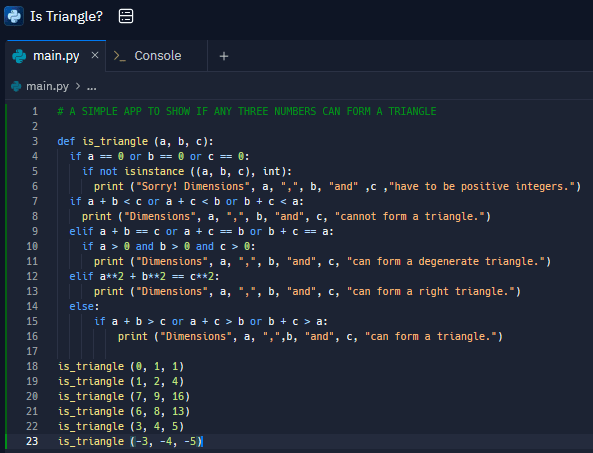
Here I go …
LINE 1:
This line has a comment. Comments in Python start with a ‘#’ symbol. Comments are used to explain what is happening to the code (or a program) that is below them.
LINE 3:
This line is declaring, or defining, a function and that is why we start it with a ‘def‘ (short term for ‘define‘).
A function starts with the def keyword and is followed by the name of that specific function (which is is_triangle for our case). You can use any name as long as it obeys the rules of Python. After the function-name, arguments follow which must be inside the ‘()’ brackets. A function in Python must end with a ‘:‘ colon.
LINE 4 TO 16:
This lines contain conditionals for the function. Conditionals are nested within the function. There are print commands beneath each conditional that returns the relevant answer depending on whether the conditions have been met.
If you look keenly at these conditionals, you will see a flow that makes sense in English.
if this then print this => else if (elif) this then print this => else print this
The else conditional should come last because you’re telling the thing executing the function what final answer you want to print or show if all the conditions above were not met.
Lines 18 to 23:
This lines simply contain the function calls. When you call a function, you are simply telling it to display a specific answer.
Note that the function calls are indented (or in line) with where the function started. Indenting properly for any line is important! The overall code will display errors after you run it if you indented any line of the code wrong.
So after I run this code on an online 1 ‘IDE’, the results (on ‘Console’) are as follows:
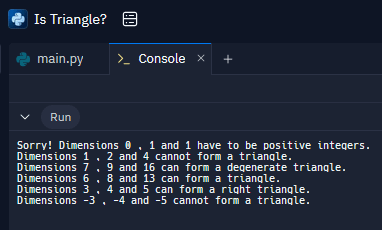
Upto to now, you must be wondering what the isinstance part of the conditional is all about. Well …
isinstance in our case tested whether any of the dimensions a, b, and c of a triangle is equal to zero. If any of the dimensions given is zero, then “Sorry! Dimensions a, b and c have to be positive integers.” is printed on the screen of the device of the app user.
2 That’s the end of my explanation of a program in Python. I hope that you learned something. Please do further research on programs created using this lovely programming language in order to understand the topic better.
Footnotes:
- IDE is short form of Integrated Development Environment. It’s simply a code-editor just like we have photo-editors for our phone’s pictures. ↩︎
- Please learn Python programming wholly from a book. I highly recommend that you use the ‘Think Python 2e’ book available online in HTML and PDF formats. ↩︎
 JoE ADiX